How to turn one stream into clips for every platform
To turn one stream into clips for every platform, find the moments that make sense on their own, cut each to under a minute, reframe it vertical on whoever is talking, burn in captions, and post it with a caption written for that platform.
BrightSide Streams does the cutting for you: moments you mark during the show, and the ones your AI crew or AI app picks, come out as vertical, captioned clips on a shelf you approve before anything posts.
Which moments make good clips?
A good clip makes sense to someone who never saw the show. Look for a strong first line, a short story with a turn in it, a surprising number, a clear answer to a question people ask, or two people disagreeing.
Skip the moments that need the ten minutes before them. If you have to explain the setup in the caption, it is not a clip yet.
What shape and length should clips be for each platform?
Vertical 9:16 is the shape for TikTok, YouTube Shorts, Instagram Reels and Facebook Reels. Most strong clips run 15 to 60 seconds, long enough for one idea and short enough to finish. Keep the full episode 16:9 for YouTube and for people watching on a screen.
Each platform changes its own limits from time to time, so check them when you plan a longer clip.
How should the caption change for each platform?
Let the first line of the caption do the same job as the hook: say what the clip is about. On YouTube Shorts the title is searched, so use the words people would type. On TikTok and Instagram a line or two and three to five hashtags is plenty. On paid studio plans Nova, the social media manager on your AI crew, writes these captions for you.
How do you turn a stream into clips by hand?
- Find the moments. Watch the replay or read the transcript, and note the start and end time of each one.
- Cut each one with a little lead-in. Start on the first word that matters, not the breath before it.
- Reframe it to 9:16. Keep whoever is talking in the frame, and follow the conversation when it moves.
- Burn in captions. Many people scroll with the sound off.
- Put a hook on screen. A few words in the first seconds that say why to keep watching.
- Write a caption for each platform. A line or two and a few hashtags that fit where it is going.
- Space them out. One clip a day from a single show keeps it working for a week.
That is the whole job, and it is slow by hand. Here is how BrightSide Streams does it.
How does BrightSide Streams make clips from your stream?
- Mark moments live. Press X during the show to mark a moment. After the show each marked moment is cut as a clip, with no AI involved.
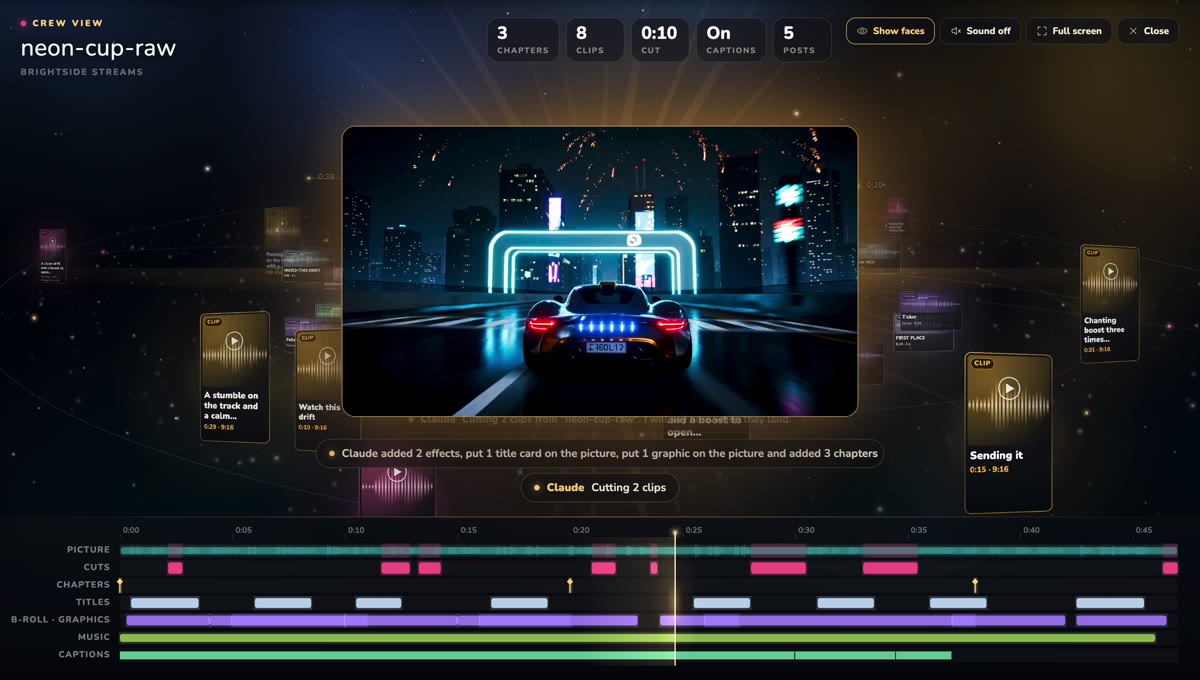
- Let the studio pick more. With the AI Studio add-on the studio reads the transcript and cuts clips on every episode. On paid studio plans Kit, the clip maker on your AI crew, puts clips on your shelf after each recording.
- Or ask for a moment. Ask Kit or your AI app for a moment as a clip, up to three at a time, each 5 to 60 seconds.
- Every clip comes out ready to post. It is vertical by default, framed on whoever is talking, with captions in your show's caption look burned into the picture, and your brand on it.
- Review your clip shelf. New clips wait as pending. Approve the ones you like and hide the rest. Nothing is public until you approve it.
- Post where each one fits. Post an approved clip to your connected YouTube channel as a Short, or to TikTok, and the studio asks you first. On paid plans Nova drafts a posting plan: approve it and your clips go out on your YouTube posting times one at a time, with ready-to-post kits for Instagram, Facebook and TikTok.
Should you multistream the show and clip it too?
Yes. They do different jobs. Multistream to all your platforms at once while you are live, so everyone who follows you can watch now. Then the clips find new people for days after the show ends.
The same recording feeds both. Your automatic edit gives you the full episode, and the clips come from that same show. If you would rather ask than click, you can edit with Claude, ChatGPT or any AI and ask for clips in plain words.
One show in. Clips for every platform out.
Try it freeFree plan: 30 studio minutes a month in full 1080p. Paid plans start with a 3-day free trial.
Questions people ask
How many clips should I make from one stream?
As many as there are moments that stand on their own. For an hour-long show that is often five to ten. Post the best ones first and space them out.
Do my clips post automatically?
No. New clips wait on your clip shelf as pending until you approve them, and posting a clip to YouTube or TikTok asks you first.
Can I make clips from a video I did not record in BrightSide Streams?
Yes. Upload the video and it opens in the editor, then ask for the moments you want as clips the same way.
What shape are the clips?
Clips are vertical by default, framed on whoever is talking, and you can choose square or wide in your clip settings. The full episode can be made 16:9, 1:1, 9:16 or audio only in the editor.
Is it free?
The free plan includes 30 studio minutes a month in full 1080p with no card. Paid plans start with a 3-day free trial that takes a card. The AI crew is on paid studio plans, and clips on every episode come with the AI Studio add-on.