How to edit your podcast with Claude, ChatGPT or any AI
To edit your podcast with Claude, ChatGPT or another AI app, connect the AI to an editor it can control, then ask in plain words. With BrightSide Streams you add one connector address, https://brightsidestreams.com/mcp, sign in, and your AI can find moments, cut, add captions, chapters and music, and make clips.
Every edit lands on a draft you can undo, and anything that publishes or posts waits for your yes.
Why can an AI chat not edit my podcast on its own?
An AI chat can read a transcript you paste in and suggest what to cut. It cannot open your video and move anything, so you end up copying timestamps into an editor by hand.
A connector fixes that. MCP, the Model Context Protocol, is an open standard that lets an AI app use the tools of another service after you sign in. Once your AI app is connected to your studio, it can make the edit itself instead of describing it.
How do you edit a podcast with AI without a connector?
If your editor has no connector, this still saves time:
- Export the transcript with timestamps. Most editors and transcription tools can save one as text or as captions.
- Paste it into your AI app and ask for a plan. Ask for the cuts (filler, false starts, tangents), chapter titles with their times, three title ideas and the strongest moments for clips with start and end times.
- Make the cuts yourself. Work through the list in your editor, checking each time against the video.
- Check the timings after each cut. Every cut shifts everything after it, so work from the end of the episode backwards.
It works, but you are still the hands. With a connector the AI does the clicking.
What do you need to edit with Claude or ChatGPT?
- A BrightSide Streams account. The connector works on every studio plan, including Free.
- An AI app that can add a remote MCP connector by its address with a sign-in, such as Claude or ChatGPT.
- An episode you recorded or uploaded in the studio.
How do you connect BrightSide Streams to Claude?
- Open Customize, then Connectors. In Claude, this is where custom connectors are added.
- Choose Add, then Add custom connector. Name it BrightSide Streams.
- Paste the address. Use https://brightsidestreams.com/mcp, continue through the sign-in settings, and choose Add.
- Connect and sign in. Claude opens the BrightSide Streams sign-in page. Sign in to your studio, read what Claude may do, and say yes.
- Turn it on in a chat and ask. Open the connectors menu in a chat, switch BrightSide Streams on, and ask in plain words.
Menu names can change between versions, and Claude's own help page has the current path. On Team and Enterprise plans an Owner adds the connector for the organization, then each person connects with their own studio.
https://brightsidestreams.com/mcp
How do you connect it to ChatGPT or another AI app?
Any app that adds a remote MCP server by address with a sign-in works the same way: paste the address, sign in to your studio, and say yes. In ChatGPT this is done from Settings, and which plans can add connectors is set by ChatGPT. Our connect page has the current steps for each app.
What can you ask your AI to do?
Ask the way you would ask an editor sitting next to you:
- In my newest episode, take out the filler words and long pauses, turn on captions, and add chapters.
- Find where Ana talks about her first sponsor in last week's episode and make a 30-second vertical clip of it.
- Put chill music under the first minute and a title on screen with the episode name.
- Show me the clips waiting for review on my newest episode.
- Is my latest episode ready to publish? Tell me what is missing.
Every edit lands on the episode's ready draft as one undo step, and your own edit is never changed. Ask for a preview and you get a link that opens the studio editor and plays the draft. Your AI can also bring in pictures, video and sound it made, and add the studio's animated graphics. The readiness check is Lexi's, and the crew is on paid studio plans.
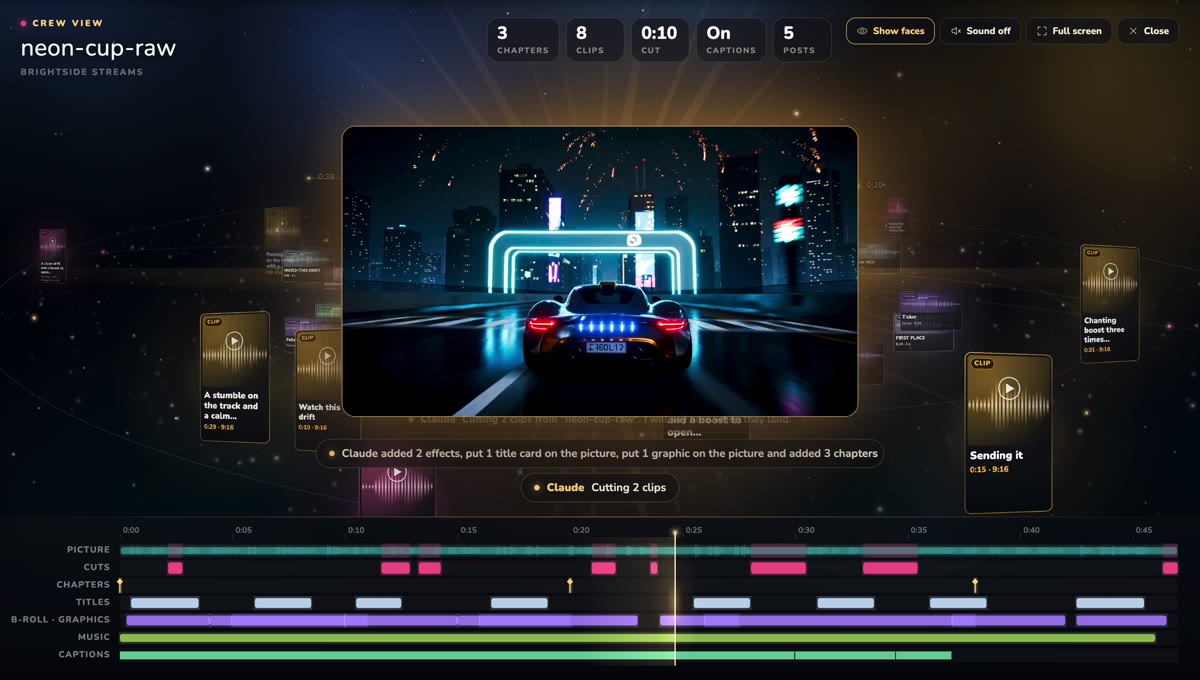
What will the connector never do?
It never sees your password or your stream keys, it cannot go live, and it cannot delete anything. Anything that publishes, posts, sends or cancels shows you what it will do and waits for your yes. You can disconnect any app at any time in the studio, under Settings, Connected apps, and see what each app did there.
Is there anything it cannot do yet?
On a video you uploaded, a background swap or an effect shows in the editor preview only. The studio cannot render it into an uploaded file yet. On a show recorded in the studio, both are rendered from each person's camera.
Prefer to edit by hand? Every episode also opens in the studio editor, and the automatic edit is waiting there when you do.
Bring your studio into the AI app you already use.
Connect your AI appFree plan: 30 studio minutes a month in full 1080p. Paid plans start with a 3-day free trial.
Questions people ask
Does the BrightSide Streams connector work on the free plan?
Yes. The connector works on every studio plan, including Free. The AI crew tools, like the readiness check and the posting plan, are on paid studio plans.
Is it safe to let an AI edit my podcast?
Edits land on a draft with undo, and your own edit is never changed. The connector never sees your password or stream keys, cannot go live and cannot delete anything, and publishing or posting waits for your yes.
Which AI apps can edit my podcast this way?
Claude, ChatGPT and other AI apps that can add a remote MCP connector by its address with a sign-in.
What is the BrightSide Streams connector address?
https://brightsidestreams.com/mcp. Add it as a custom connector in your AI app, then sign in to your studio.
Can my AI post my clips for me?
It can post an approved clip to your connected YouTube channel as a Short, or to TikTok, and it always asks you first.